MyFinanceBook

Your ledger.Your assistant.No bank login.

A personal finance tracker built from the statements you export. Review every row before it's saved, then ask your own AI assistant where your money went.

No card needed.

Example

You

What did I spend on groceries last month?

Assistant

€552.40 across 10 transactions, €36.85 less than the month before. The biggest was €96.85 at Lindenhof Market.

The MyFinanceBook dashboard for last month in a demo account, showing €3,540 of spending.

How it works

  1. Upload it

    Export a PDF or CSV from your bank and upload it. Each import takes one statement – a PDF of up to 3 pages, or a CSV of up to 75 rows. There is no bank connection, so you choose what to share and when.

  2. Check the rows

    Every transaction is shown to you first, with a category suggested for each. Nothing reaches your ledger until you say so. Rows in another currency are converted at the rate for their own date, and anything unclear is flagged. Upload the same statement again and you are told before anything is duplicated. You choose which of your accounts or cards the rows are saved to, and money moved between your own accounts is suggested as a transfer, which totals leave out.

  3. Ask

    Ask about your money in plain words – the assistant inside the app, or Claude once you've connected it.

  1. Statement
  2. Review
  3. Ledger
Reviewing an imported statement: amounts converted from pounds to euros with the originals shown, a suggested category on every row, and a row flagged for a new category.

What makes it different

Ask, don't look.

Your finances answer from the assistant you already have open. Ask “how much did I spend on groceries in July?” and get the number – in Claude, on your laptop or your phone, without opening the app at all.

MyFinanceBook is listed in Claude's connector directory: open it there, click Connect and sign in. It works with your Claude account – free plans included. How to connect

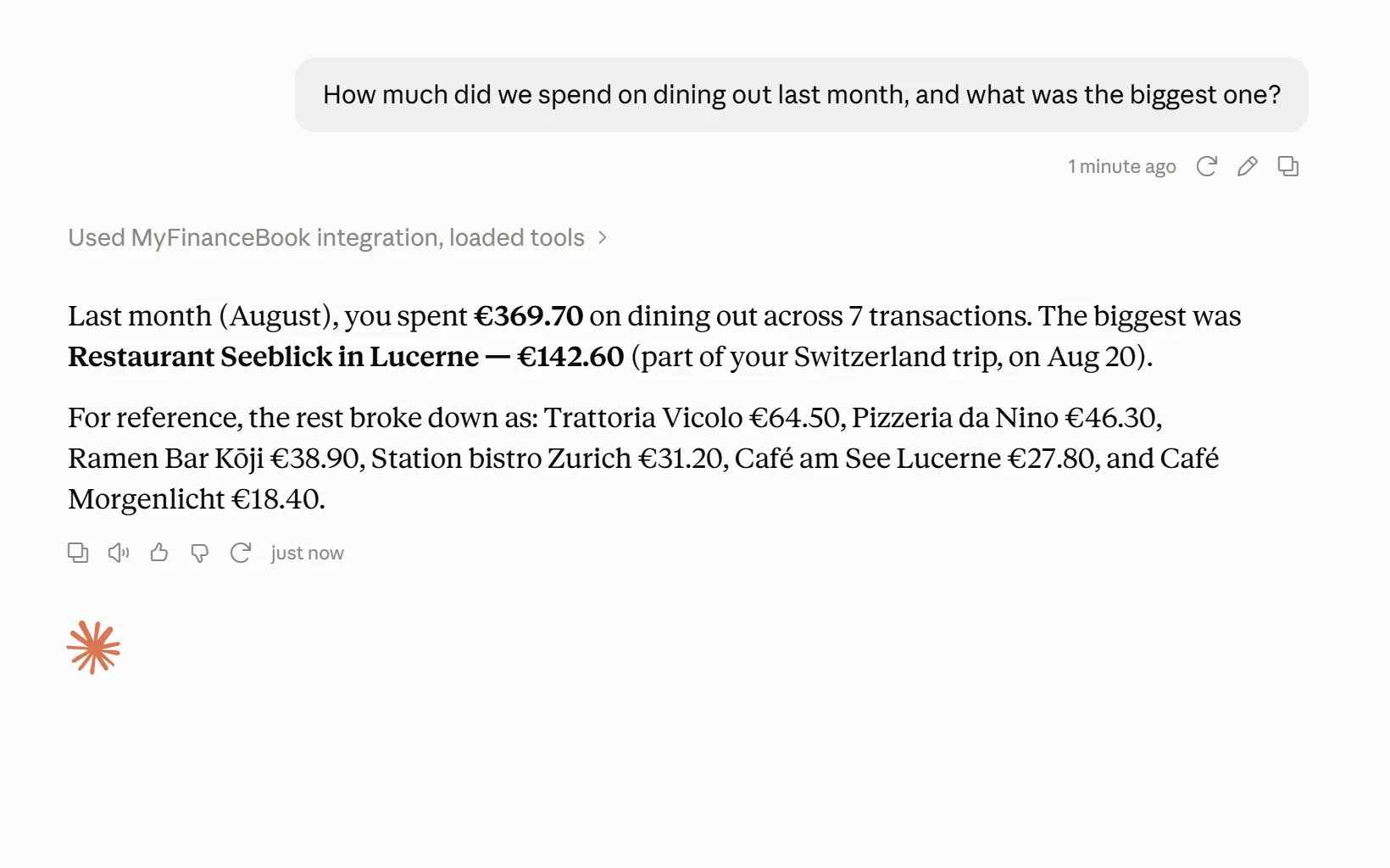
Claude answering how much was spent on dining out last month, and naming the biggest bill, from a connected MyFinanceBook account.
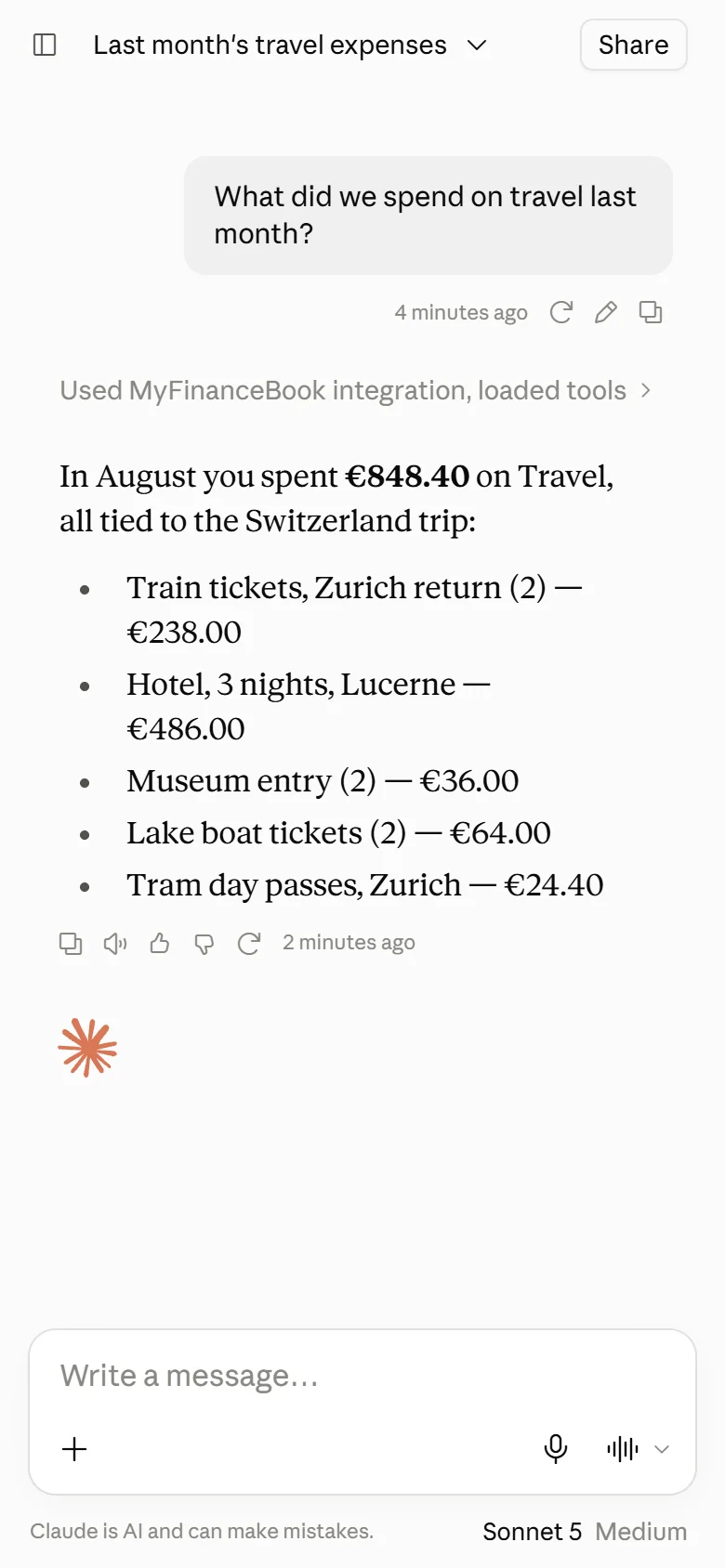
Claude on a phone answering what was spent on travel last month from the same ledger.
Claude, Anthropic's assistant, reading a MyFinanceBook demo account. MyFinanceBook is independent and is not affiliated with or endorsed by Anthropic.

No AI assistant of your own? One's built in. Ask it about your spending right inside the app – your first 3 statement imports and 20 questions are on us. After that, from €11.99 a year.

It gives budgeting and saving rules of thumb. It does not advise on investments, and nothing in MyFinanceBook is financial, investment or tax advice.

The built-in assistant answering what was spent on groceries last month: €552.40 across 10 transactions.

We never touch your bank – and we barely know who you are.

There is no bank-connection service, no Open Banking link, no aggregator, no standing access to revoke – because nothing stands. You export a statement yourself; the app reads it and discards the file. Your full account number is thrown away on receipt; only the last four characters survive – to spot a re-imported statement, and to show which of your accounts a transaction came from. Your MyFinanceBook account is an email address, a currency and a time zone. No name, no address, no phone.

Don't take our word for any of it – download your data and read it. A zip of CSV files holding your profile, your categories, your accounts (a name, a bank and four characters each), your transactions and your imported statements. It takes about thirty seconds.

Your AI can add. It cannot alter.

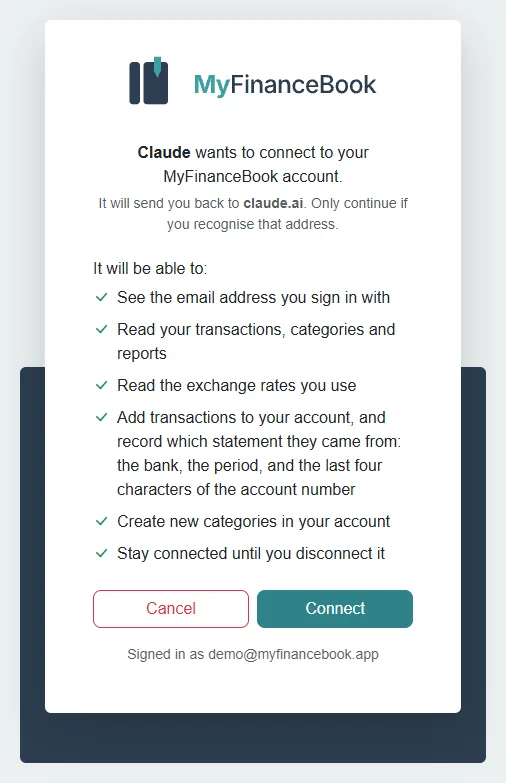
A connected assistant can read your transactions and add new ones, but it can't change or delete anything already there – not because a permission says no, but because no such tool exists. Edits and deletions stay with you, in MyFinanceBook. Read the consent screen before you approve it.

Your assistant can

  • Read your transactions and reports
  • Add transactions
  • Add a category

Only you can

  • Edit a transaction
  • Delete a transaction
  • Remove a category
  • Change a setting
  • Download your export
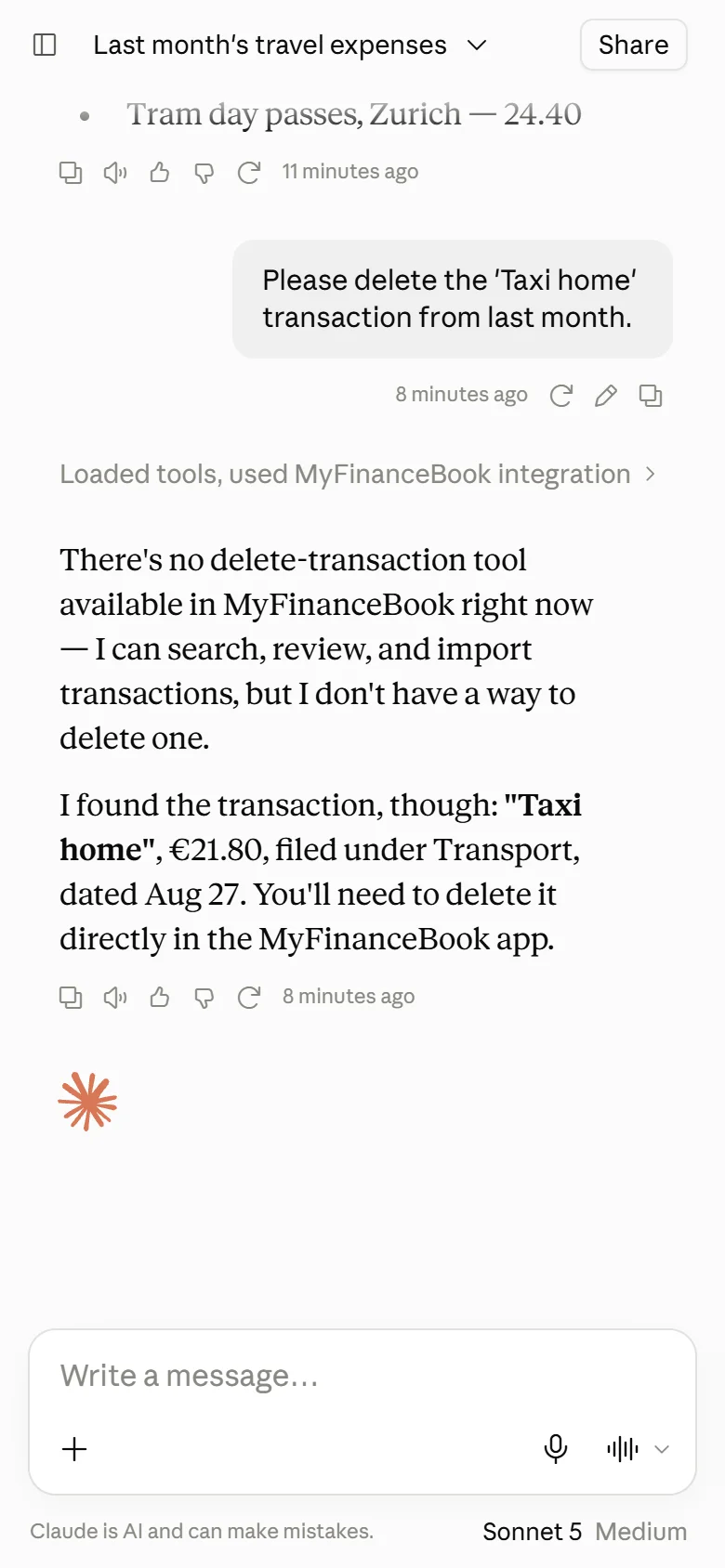
Claude declining a request to delete a transaction, explaining that the connection gives it no way to edit or delete.
Asked to delete a transaction, Claude explains it has no tool for that.
The consent screen shown while connecting Claude, listing in plain sentences what it will be able to do.
The consent screen, in plain sentences.
The Connected apps page listing Claude, what it was granted and when, with a button to revoke it.
Every connection listed under Connected apps, and revocable there.

What we keep, and what we never keep

Most of this page could be written by any app. This part could not, so it is worth reading.

Kept

  • Your email address
  • A default currency and a time zone
  • Your transactions and categories, as you wrote them
  • The bank and last 4 characters of each account a statement names, and the name you give it
  • Which statement was imported, and when
  • Which site or campaign sent you, if one did

Never kept

  • Your name, address or phone number
  • The statement file itself
  • Full account numbers or IBANs
  • Your card details, which only our payment provider sees
  • Bank credentials – there is nothing to connect

About your statement. To turn it into rows, we send it to Claude, Anthropic's AI, under a business agreement – not into the public Claude app. We never save the file, and Anthropic's terms don't allow it to train its models on what you send. Rather not send it at all? Add transactions by hand.

Exactly what happens to your statement

Everything above can be downloaded as a zip of CSV files, and everything can be deleted outright.

Thirteen currencies

Keep your ledger in any of these thirteen currencies. Statements in any of the others are converted automatically, row by row, at the rate for the day each transaction happened.

  • AUD
  • CAD
  • CHF
  • CZK
  • DKK
  • EUR
  • GBP
  • NOK
  • NZD
  • PLN
  • SEK
  • UAH
  • USD

Choose your home currency when you sign up. It can't be changed later.

Plans

Free forever: your ledger, your reports, your export, and the Claude connector.

Free

€0

Plus a one-time welcome credit: 3 statement imports and 20 questions to the built-in assistant.

Base

€11.99 a year

or €1.49 a month, VAT included

We can afford to give the connector away because your assistant does the work, and we never touch your bank.

See the plans

Questions

What is MyFinanceBook?

MyFinanceBook is an income and expense tracker built from the bank statements you export, as PDF or CSV. You review every row before it's saved, then ask the built-in assistant or Claude where your money went. There is no bank connection.

Is there a mobile app?

Not yet. The Claude connector is free on every plan, and Claude is on your phone – so your ledger is already mobile, it just isn't our app.

You send my statement to Anthropic – how is that better than connecting my bank?

It is a difference in kind. An aggregator holds standing, live access to your account and keeps pulling. A statement is one bounded historical document you chose to hand over, read once and discarded. There is no connection to revoke because nothing stands. And if that is still too much, manual entry works.

Does it do budgets or savings goals?

Not yet. Today the app gives you a straight answer about your money. It doesn't put you on a program. Budgeting is on the roadmap, and it arrives in the plan you're already on – it won't become a higher tier.

Can my partner and I share one ledger?

Yes. Import both your statements into one ledger, and the totals cover you both, with no extra charge per person. Each transaction shows which account it came from, so you can look at one card at a time. We sort by account, not by person: the app never needs to know your names.

Does moving money between my own accounts count as spending?

No. Transfers between your own accounts, cash withdrawals and savings top-ups go in the transfer category, and totals, charts and the assistant leave that category out. The statement import suggests it for those rows, and you can change it. Because a cash withdrawal isn't counted, what you buy with the cash counts only when you add it by hand.

Which AI assistants work with MyFinanceBook?

Claude, through the connector, and the assistant built into the app. The app is built to add others, and they're on the roadmap.

Can I export my data and leave?

Your ledger exports to CSV whenever you like and imports back in cleanly, and you can delete your account yourself, from Settings. You're never locked in.

How much does MyFinanceBook cost?

The ledger, the reports, the export and the Claude connector are free, permanently. You pay only if you want the app itself to do the AI work – from €11.99 a year, VAT included. See the plans

Does MyFinanceBook give financial advice?

No, and deliberately not. It'll answer questions about money you've already recorded and give ordinary rules of thumb – ask whether €550 on groceries is a lot and it'll ask what country you're in and how many people you're feeding, then tell you. It has nothing to say about investments, crypto or what to do with your savings.

Ask where your money went.Nobody connects to your bank.

No card needed.